Now for macOS

Your whole web,
native on the Mac.

The RSS reader and podcast player you love, rebuilt as a true Mac app - a resizable three-pane layout, full keyboard control, and everything still fast, local, and private.

Free with no restrictions · Designed for macOS

uRSS for Mac showing the sidebar, article list, and reader side by side
Built for the desktop

Not a blown-up phone app.

uRSS for Mac is designed from the ground up for a big screen and a keyboard - a proper Mac window, real columns, and menu-bar commands for everything you do most.

The headline feature

Podcasts, with a real Now Playing window.

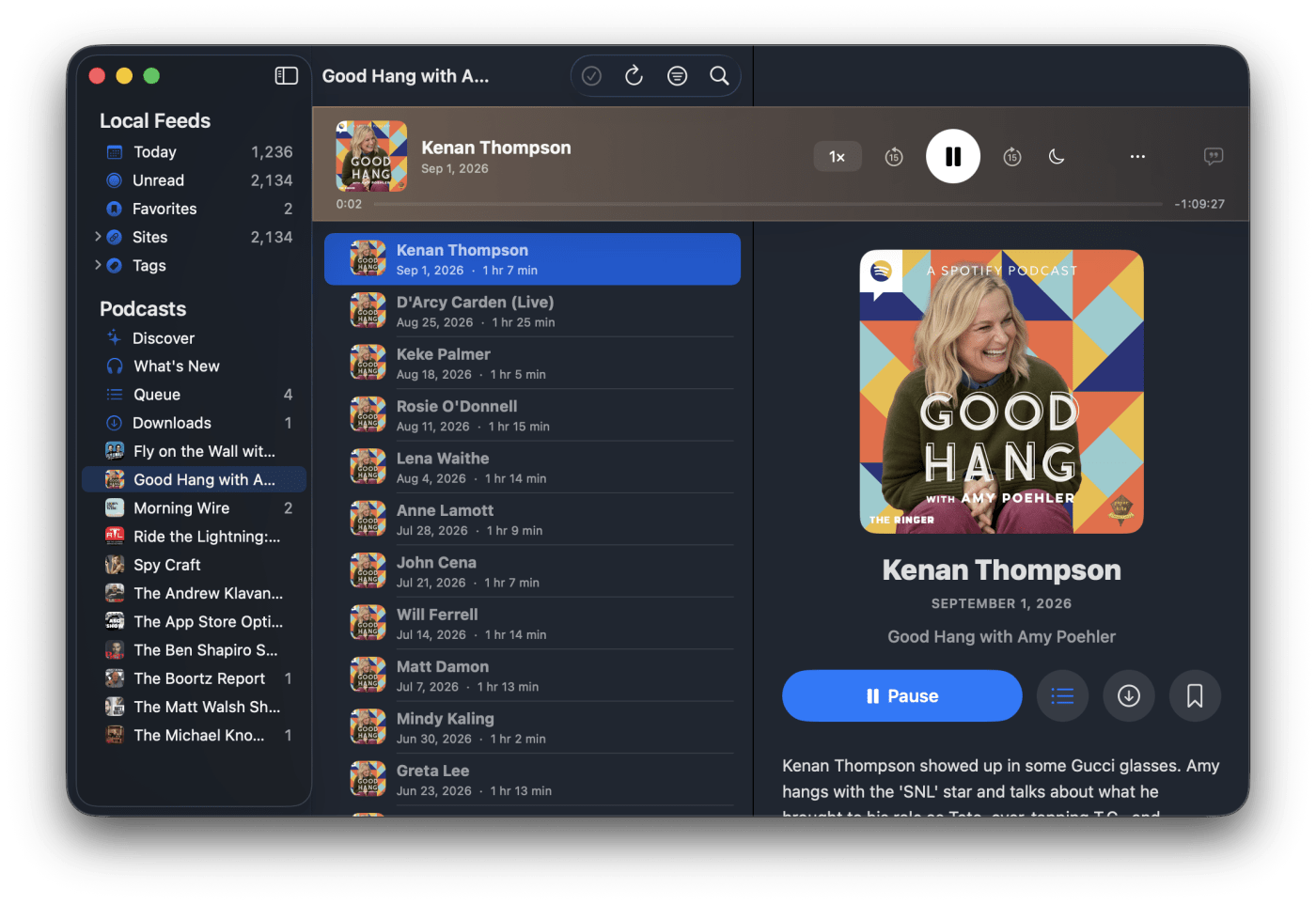
Subscribe, stream, and download your shows right alongside your feeds. Pop playback out into a dedicated Now Playing window you can keep in a corner while you read - with a queue, transcripts, variable speed, and a sleep timer.

  • A detachable Now Playing window that stays out of the way
  • Smart queue & Up Next, synced to where you stopped
  • Tap-to-jump transcripts, variable speed, and offline downloads
  • Media keys and system Now Playing controls, right out of the box
Podcast episode list and show detail in uRSS for Mac
The standalone Now Playing window in uRSS for Mac
A sidebar that scales

Everything, one click away.

Group hundreds of sources into nested folders, jump to Today, Unread, or Favorites, and browse by Tag - all from a source list built for a real sidebar. Drag to reorder, disclose to dig in, and keep even a huge library tidy.

Organized folders of sites in the uRSS for Mac sidebar
Machine learning

Every story, tagged for you.

On-device machine learning reads each new article and tags it by topic, brand, team, or person - automatically. Browse your whole library by Tag in the sidebar and jump straight to "Automotive," "Tesla," or "Apple" without ever tagging a thing by hand. It all happens on your Mac; nothing leaves the device.

Articles automatically tagged by machine learning, browsable in the Tags sidebar of uRSS for Mac
Smart Favorites settings in uRSS for Mac
Smart Favorites

Favorites that keep up.

Add the names, topics, and phrases you care about, and uRSS automatically favorites new stories that mention them - across every source. Follow a beat like "John Ternus" or "macOS 27" and never miss it in the noise.

Muted words

Mute the noise.

Hide stories with the words, names, or phrases you'd rather skip. Set it once and every list stays calm - no spoilers, no outrage cycles, no repeats of the same headline across ten sources.

Muted Words settings in uRSS for Mac
Distraction-free reader view in uRSS for Mac
The playback bar docked above the article list in uRSS for Mac
Read & listen

Focused reading, playback on top.

A clean reader view strips articles down to the words, while a slim playback bar keeps your current episode a click away - so you can read one thing and listen to another without ever leaving the window.

Your feeds and shows,
at home on the Mac.

Download uRSS for Mac today -
free with no restrictions, no account required.

Looking for iPhone & iPad? →